Chapter 6: Expert Review and Feedback
This chapter explains the expert review system that helps improve SleepCoder's machine learning algorithms. By providing feedback on sleep system recommendations, you contribute to continuously refining the scoring accuracy and recommendation quality.
For an overview of how SleepCoder scores sleep systems, see Chapter 0: Introduction. For information on the canvas interface where recommendations are displayed, refer to Chapter 4: Main User Interface.
Why Expert Review Matters
SleepCoder is a Self-Learning System
To help improve the SleepCoder scoring algorithm, users are encouraged to review and provide feedback on sleep systems—particularly those that were not chosen. This expert feedback is used to train and refine the machine learning models, making future recommendations more accurate for all users.
Your professional expertise as a sleep specialist directly contributes to improving the system's ability to match clients with optimal sleep solutions.
Sleep System Expert Review Card
When you click on any sleep system card in the canvas, the Expert Review form appears, inviting you to provide professional feedback on the system's suitability for the current client.
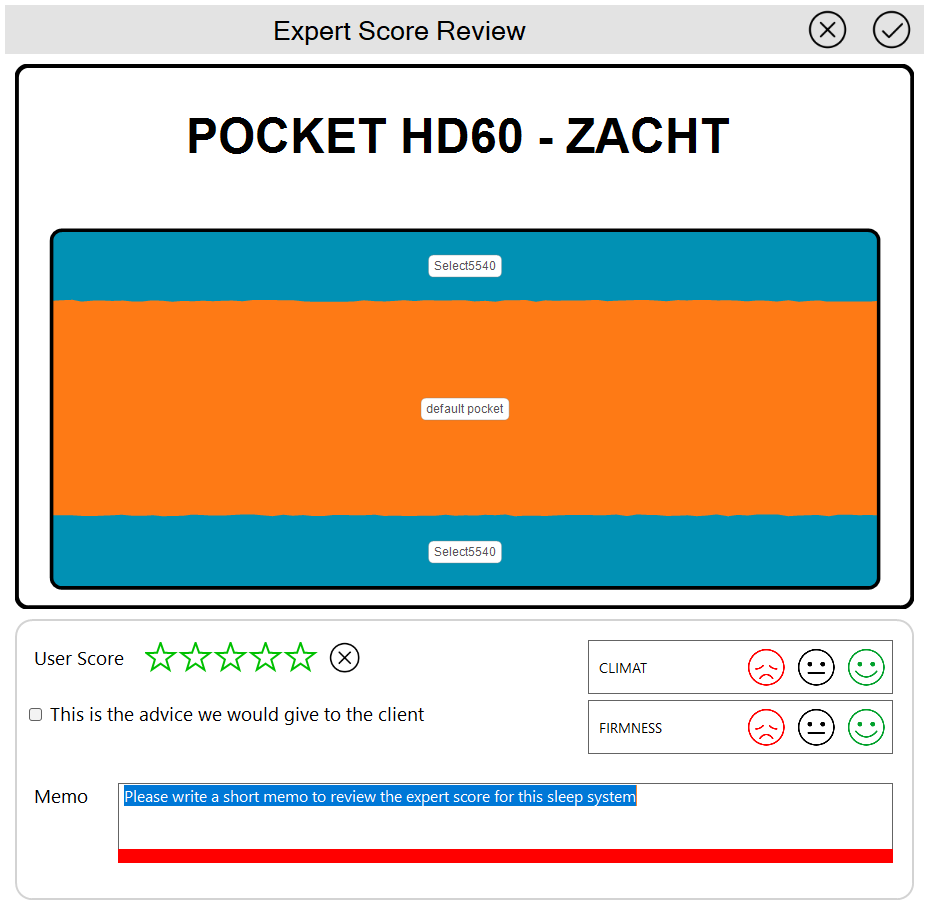
Review Questions
The review form asks you to evaluate the system based on key criteria:
Climate Suitability
- Does this system suit the user's climate preferences?
- Consider thermal regulation, breathability, and heat retention
- Compare against the client's stated climate preference (cool to warm)
Firmness Suitability
- Does this system suit the user's firmness preferences?
- Evaluate whether the actual firmness matches the client's preference
- Example: If the system feels soft but the user requested firmer support, indicate "wrong"
Overall Expert Score
- What score would you, as a sleep specialist, give this sleep system for this specific client?
- Consider all factors: support, comfort, price, materials, and client preferences
- Use your professional judgment and experience
Chosen System Indicator
- If this is the system you advised or the client chose, check the "Chosen System" checkbox
- Only one system should be marked as chosen per client session
💡 Tip: Be honest and specific in your feedback. This data helps train the algorithm to better match your professional judgment.
Automatic Review Request for Top Recommendations
Whenever you mark a sleep system as the "chosen" system, SleepCoder automatically presents the top 3 systems (excluding the chosen one) from its recommendations for expert review.
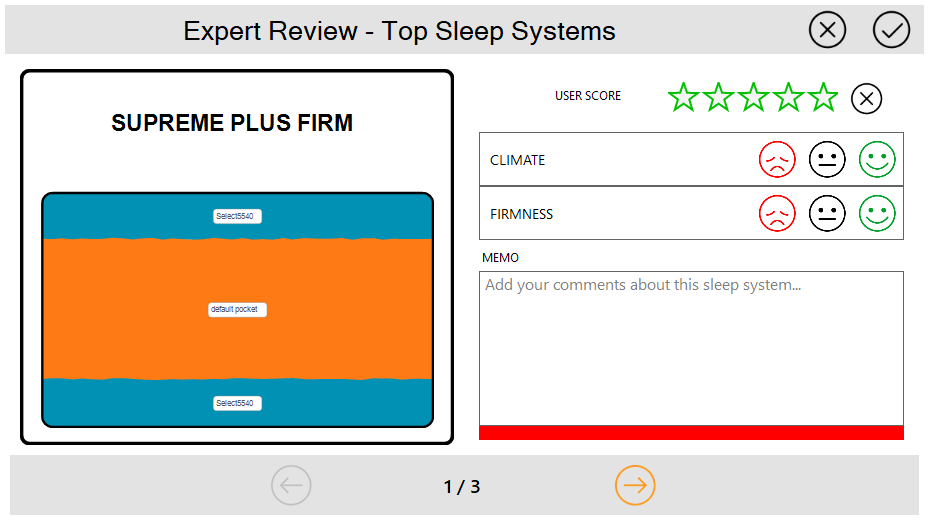
This workflow ensures that you provide comparative feedback, helping the system understand:
- Why the chosen system was preferred over SleepCoder's top recommendations
- What factors influenced your professional judgment
- How to better align future recommendations with expert preferences
⚠️ Important: This comparative feedback is particularly valuable for machine learning, as it helps the algorithm understand the nuances of expert decision-making.
Viewing All Reviews
In the canvas view, all systems with expert reviews are marked with a yellow badge for easy identification.
To View All Reviews:
- Click the "Expert Reviews" button in the Status/Action Bar (see Chapter 4: Main User Interface)
- A carousel display shows all review details
- Navigate through reviews to see your feedback history
- Use this feature to verify reviews before saving client data
💡 Tip: Review the feedback summary before finalizing a client session to ensure all important observations are captured.
Best Practices for Expert Reviews
Do Provide Feedback When:
- The chosen system differs significantly from SleepCoder's top recommendation
- You notice patterns in scoring that don't match your professional experience
- A client rejects a highly-scored system for specific reasons
- You have insights about why a particular system works better
Be Specific About:
- Climate issues (too warm, too cool, breathability concerns)
- Firmness mismatches (too soft, too firm for the client's needs)
- Support concerns (pressure points, inadequate support zones)
- Material preferences the client expressed
- Price considerations that influenced the decision
Benefits of Consistent Reviews:
- Improves recommendation accuracy for future clients
- Helps identify patterns in client preferences
- Contributes to the collective knowledge of all SleepCoder users
- Enables data-driven insights into sleep system performance
Next Steps: After completing a client consultation and providing expert feedback, save the client data using the "Add Reference" button. For information on other interface features, return to Chapter 4: Main User Interface. For technical details about data security, see Chapter 7: Technical Requirements.