SleepCoder User Manual
Welcome to the SleepCoder User Manual! This comprehensive guide will help you understand and use the SleepCoder application to find the perfect sleep system for your clients.
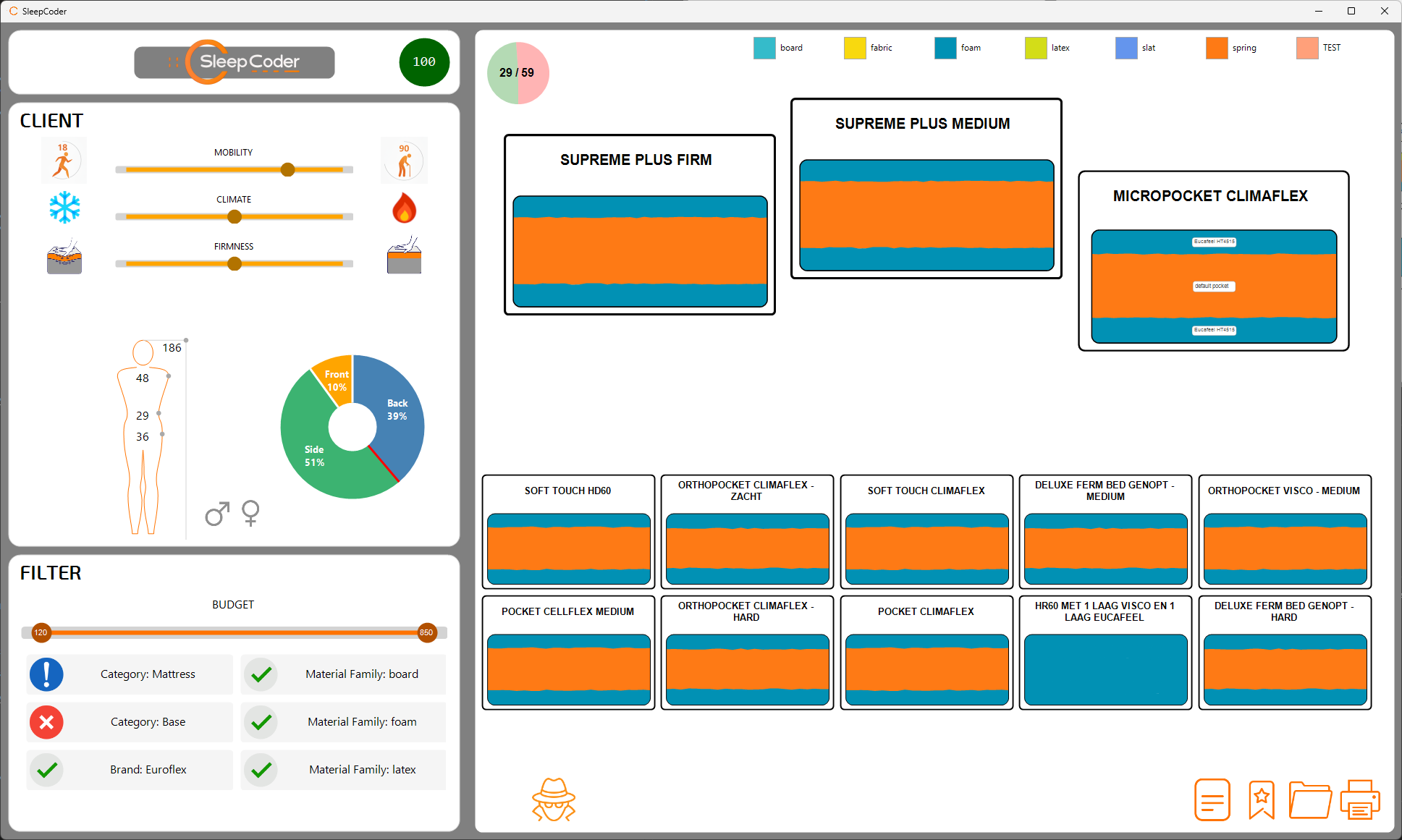
Table of Contents
- Introduction - Overview of SleepCoder features and capabilities
- Installation and Licensing - Installation process, user license activation, and API credentials configuration
- Startup, Updates, and User Settings - Application startup, change log, license management, and API credentials
- Component Library Management - Managing mattresses, bases, pillows, toppers, and their properties
- Main User Interface - Understanding the SleepCoder interface and navigation
- Body Measurement - Accurate measurement techniques using Body Wizard or Tatchi scanner
- Expert Review and Feedback - Reviewing sleep systems and providing expert feedback for machine learning
- Technical Requirements - System requirements, network configuration, and data security
What is SleepCoder?
SleepCoder is a professional sleep consultation tool designed for mattress retailers, sleep specialists, and bedding consultants. It employs advanced algorithms and biomechanical principles to recommend optimal sleep systems based on comprehensive client data including:
- Anthropometric Data - Precise body measurements and dimensions
- Sleep Preferences - Individual comfort, temperature, and mobility needs
- Sleep Positions - Preferred sleeping postures (back, side, stomach)
- Budget Constraints - Client budget parameters for each component category
- Material Preferences - Eco-friendliness, material types, and brand preferences
The application evaluates and scores sleep systems across multiple dimensions:
- Support Score - How effectively the system supports the body's natural curves and weight distribution
- Firmness Score - Match between client's preferred firmness level and actual mattress feel
- Climate Score - Temperature regulation capabilities aligned with thermal preferences
Each sleep system receives an overall score, enabling data-driven recommendations that enhance customer satisfaction and improve sales outcomes.
Quick Start Guide
If you're new to SleepCoder, follow these steps to get started:
1. Launch and Initialize
- Start the SleepCoder application
- Enter your user license credentials and API credentials in the user settings form (see Chapter 1: Installation for details)
- The application will authenticate and load the complete product library from the server
2. Start a New Client Session
- Click the SleepCoder logo in the top-left corner to begin a fresh session
- The canvas will display all available sleep system combinations from your inventory
- For detailed interface information, see Chapter 4: Main User Interface
3. Enter Client Body Measurements
- Click on the body icon/silhouette in the left panel
- Choose your measurement method:
- Body Wizard: Guided manual input with visual feedback
- Tatchi Scanner: Automated 3D body scanning (if available)
- Enter or import client measurements (height, weight, shoulder width, waist width, hip width)
- Detailed instructions are available in Chapter 5: Body Measurement
4. Configure Sleep Preferences
- Select client gender (male/female)
- Adjust the posture wheel to indicate sleeping position preferences (back/side/stomach)
- Set firmness preference using the slider (soft to firm scale)
- Set climate preference using the slider (cool to warm scale)
- Set mobility level (static to dynamic) - typically decreases with age
- More information in Chapter 4: Main User Interface
5. Apply Filters and Refine Results
- Use the right panel to filter sleep systems by:
- Brand preferences (include, exclude, or mandate specific brands)
- Budget ranges for each component category (mattress, base, pillow, topper)
- Specific component categories
- Material types (foam, latex, springs, etc.)
- See Chapter 4: Main User Interface for detailed filter options
6. Review Recommendations
- View ranked sleep systems on the canvas, organized by score (top to bottom, left to right)
- The top 3 systems are highlighted on a podium display
- Each card shows comprehensive information including scores, prices, and component details
- Click on any card to view detailed specifications and material composition
- Provide expert feedback as described in Chapter 6: Expert Review
7. Save Client Data
- Click the "Add Reference" button to save client information
- Enter client name and optional notes
- Data is securely encrypted and saved to the server for future retrieval
- Refer to Chapter 4: Main User Interface for data management details
8. Generate Professional Report
- Click the "Print" button to generate a comprehensive client report
- Choose output format (PDF or physical print)
- Report includes all measurements, preferences, recommendations, and system specifications
- Professional formatting suitable for client presentation
System Requirements
- Operating System: Windows 10 or later (Windows 11 recommended with latest security patches)
- Framework: .NET 8 Runtime
- Internet Connection: Required for API access, library updates, and data synchronization
- Display Resolution: 1920×1080 or higher recommended (font scaling: 100%)
- Processor: Intel Core i3 or equivalent AMD processor
- Memory: 4GB RAM minimum, 8GB recommended
- License: Valid SleepCoder license required
For comprehensive technical requirements, see Chapter 7: Technical Requirements.
Getting Help
In-Application Support
- Debug Report: Use Help menu to submit bug reports with screenshots
- Changelog: View recent updates and features
- Settings: Right-click logo to access configuration
External Support
- Website: https://www.custom8.be
- Email: support@custom8.be
- Documentation: This manual and online resources
Document Conventions
Throughout this manual:
- Bold text indicates UI elements, buttons, menu items, or important terminology
Code textindicates technical terms, file paths, or code snippets- 📷 Indicates where screenshots should be placed for visual reference
- ⚠️ Indicates important warnings or critical notes
- 💡 Indicates helpful tips and best practices
- Cross-reference links appear as Chapter Name for easy navigation
Version Information
Manual Version: 1.0
Application Version: Compatible with SleepCoder 1.x
Last Updated: January 2026
Copyright: Custom8 © 2025-2026
Ready to get started? Begin with Chapter 0: Introduction for a comprehensive overview of SleepCoder's features and capabilities.