Chapter 0: Introduction to SleepCoder
Overview
SleepCoder is a professional sales and consultation tool designed to help sleep specialists, mattress retailers, and bedding consultants recommend the optimal sleep system for each client. By combining scientific body measurements with personal preferences and biomechanical principles, SleepCoder provides data-driven recommendations that increase customer satisfaction and improve sales outcomes.
This chapter provides an overview of SleepCoder's core concepts, unique features, and fundamental principles. For installation instructions, proceed to Chapter 1: Installation and Licensing.
What Makes SleepCoder Unique?
1. Scientific Approach
Unlike traditional "feel-based" mattress selection, SleepCoder uses:
- Precise anthropometric measurements
- Biomechanical principles for proper spinal support
- Material science data for climate and firmness
- Statistical analysis of body dimensions
2. Comprehensive Sleep System Approach
SleepCoder doesn't just recommend mattresses—it evaluates and suggests complete sleep systems:
- Mattress: The primary support and comfort layer
- Base: Foundation that significantly affects mattress performance and longevity
- Pillow: Neck and head support for proper spinal alignment
- Topper: Additional comfort customization and fine-tuning
For detailed information on managing components, see Chapter 3: Component Library Management.
3. Real-Time Scoring and Dynamic Ranking
As you enter measurements and adjust preferences, SleepCoder provides immediate feedback:
- Recalculates scores instantly using advanced algorithms
- Re-ranks all sleep systems dynamically based on updated criteria
- Filters compatible options based on your selections
- Visualizes the best matches with clear, intuitive scoring displays
- Updates recommendations in real-time without manual refresh
The scoring methodology is explained in detail later in this chapter.
Core Concepts
I. Sleep System Composition
A sleep system is a specific combination of components designed to work together:
- Mattress (required) - The core component providing support and comfort
- Base (optional) - Foundation that can enhance or modify mattress characteristics
- Topper (optional) - Additional comfort layer for customization
- Pillow (optional) - Head and neck support component
Each sleep system in the library represents a unique combination of these components. SleepCoder automatically generates all possible valid combinations from your component inventory, creating a comprehensive catalog of available sleep systems.
For information on how to manage individual components, refer to Chapter 3: Component Library Management.
Component Structure and Layer Composition
Understanding Toppers, Mattresses, and Bases
Components are composed of multiple layers, each characterized by specific properties:
- Material: Type of material (foam, latex, springs, gel, fabric, etc.)
- Height: Layer thickness measured in centimeters
- Firmness: Material-specific firmness rating affecting support characteristics
- Climate: Thermal properties including heat retention or cooling capabilities
- Zoning: Optional zones with varying properties for different body regions
The combination and sequence of layers determine the overall performance characteristics of each component.
Example Mattress Structure:
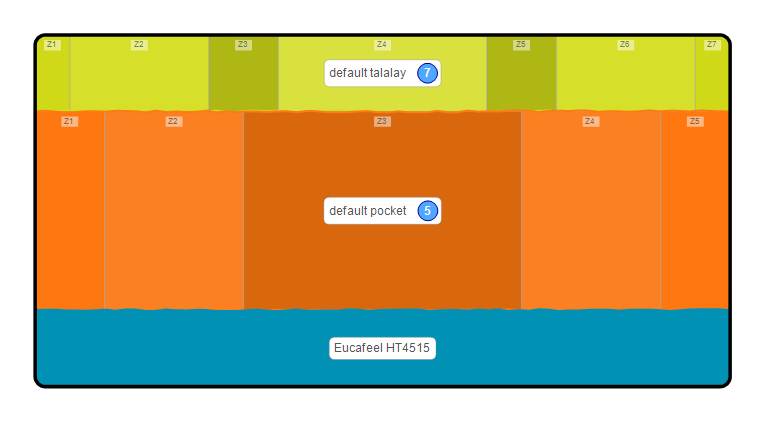
This diagram illustrates a typical mattress layer structure with multiple material zones.
II. Scoring Algorithm
SleepCoder evaluates each sleep system across three dimensions:
1. Support Score (Weight: 34%)
Measures how effectively the system supports the body's natural curves and maintains proper spinal alignment:
- Analyzes anthropometric data (shoulder, waist, and hip dimensions)
- Considers body weight distribution across different zones
- Evaluates layer firmness, material properties, and thickness
- Accounts for preferred sleeping positions and posture
- Calculates pressure point relief and support balance
Accurate body measurements are critical for this score. See Chapter 5: Body Measurement for measurement guidelines.
2. Firmness Score (Weight: 33%)
Matches client firmness preference with the actual mattress feel characteristics:
- Compares desired firmness level to calculated material properties
- Adjusts recommendations based on mobility preferences (higher firmness for lower mobility)
- Considers sleeping position preferences (side sleepers typically prefer softer, back/stomach sleepers prefer firmer)
- Evaluates perceived firmness versus actual material stiffness
Firmness preferences are configured in the client preferences panel, as described in Chapter 4: Main User Interface.
3. Climate Score (Weight: 33%)
Evaluates temperature regulation capabilities:
- Matches thermal preferences with material properties
- Considers breathability and heat retention characteristics
- Accounts for climate sensitivity and personal temperature preferences
- Evaluates airflow and moisture management properties
SleepCoder User Interface Overview
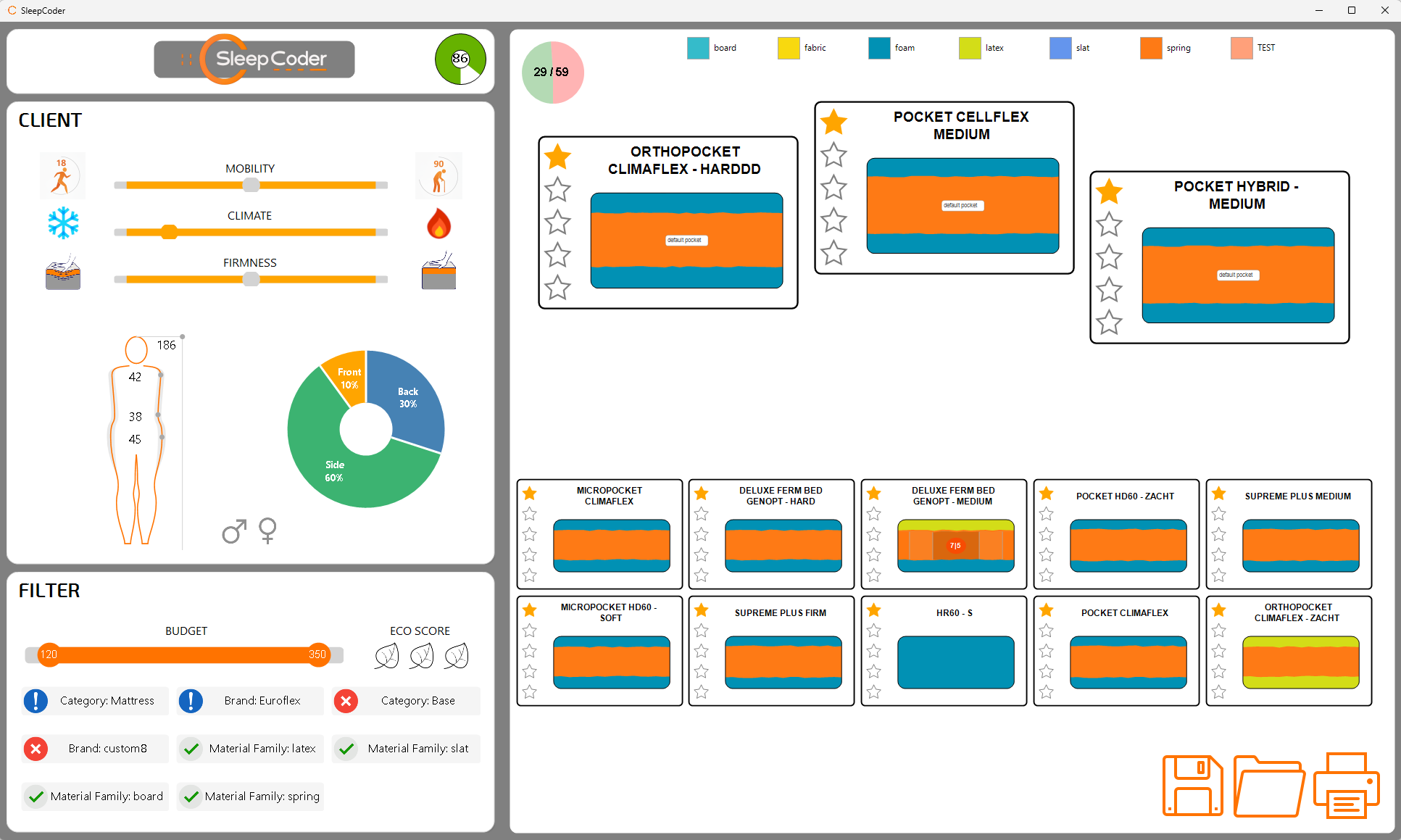
The SleepCoder main interface with labeled functional areas
The SleepCoder interface is organized into distinct functional areas for efficient workflow:
- Header Area - Application logo, body score confidence indicator, and main controls
- Client Input & Preferences Panel - Body measurements and sleep preference configuration
- Filter Panel - Brand, budget, category, and material filtering options
- Canvas Area - Visual display of ranked sleep system recommendations
- Status/Action Bar - Client management, save/load functions, and reporting tools
For a comprehensive guide to the user interface and its features, see Chapter 4: Main User Interface.
Typical Workflow Overview
The following diagram illustrates the standard workflow for a client consultation:
graph TD
  A[Start Application] --> B[New or Load Client?]
  B -- New --> C[Enter Client Data: Body + Preferences]
  B -- Load --> H[Load Existing Client Data]
  H --> D
  C --> D[Apply User Filters]
  D --> E[View Recommendations]
  E --> F[Review Expert Info]
  F --> G[Save Client Data]
  G --> I[Generate Report]
Workflow Steps Explained:
- Start Application - Launch SleepCoder and authenticate
- New or Load Client - Begin a new session or load existing client data
- Enter Client Data - Input body measurements (Chapter 5) and preferences (Chapter 4)
- Apply Filters - Refine results based on budget, brand, or material preferences
- View Recommendations - Review ranked sleep systems on the canvas
- Expert Review - Provide feedback on recommendations (Chapter 6)
- Save Data - Store client information securely for future reference
- Generate Report - Create professional client documentation
Data Persistence and Security
All client data is securely encrypted and stored on the server, enabling retrieval for follow-up consultations and providing a complete client history.
Stored Information
SleepCoder saves the following data for each client session:
- Body Measurements - Complete anthropometric data
- Sleep Preferences - Gender, posture, firmness, climate, and mobility settings
- Applied Filters - Brand, budget, category, and material filter selections
- Recommended Systems - Complete list of evaluated sleep systems with scores
- Chosen Sleep System - Final recommendation selected for the client
- Expert Review Notes - Feedback and observations from sleep specialists
- Session Metadata - Date, time, consultant name, and session notes
For information on data security and privacy, see Chapter 7: Technical Requirements.
Next Steps: Proceed to Chapter 1: Installation and Licensing to begin setting up your SleepCoder installation.